Event Log - Review Certification for Errors
The Event Log - Review Certification for Errors screen allows you to view the results of the following processes:
The Event Log pane contains only the most-recent actions.
|

|
NOTE: This Event Log screen is automatically displayed when the Review Certification for Errors (Process) completes or when the End Certification (Process) is started and one or more warnings or standard error messages are found with the certification attempt.
|
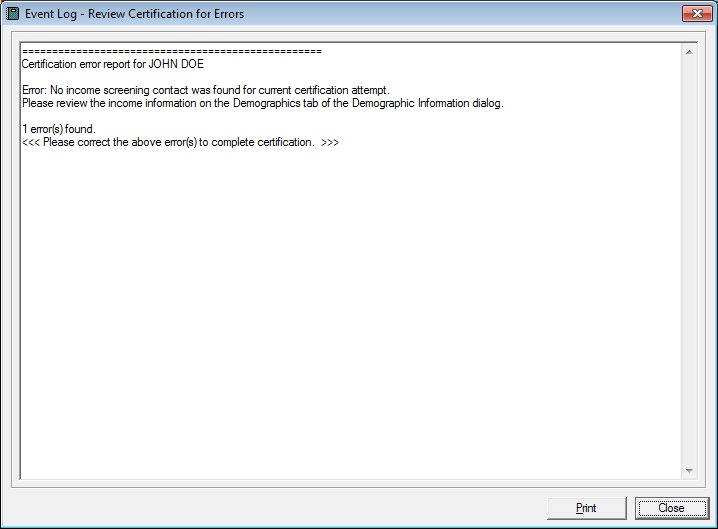
Event Log - Review Certification for Errors screen
|

|


Interface Initialization
Upon initial display of the screen, the following occurs:
-
The Event Log pane displays the text, "Certification error report for (MEMBER.FIRSTNAME, MEMBER.MIDDLEINITIAL, MEMBER.LASTNAME)".
|
Unless otherwise stated below, all controls on the Event Log - Review Certification for Errors screen are visible and enabled when:
If one or more special conditions exist that affect a control on the Event Log - Review Certification for Errors screen, the condition(s) are documented for that specific control below.
Event Log pane
View the content of the event log in the Event Log pane.
The Event Log pane contains only the most-recent actions. View the record of events and errors that occurred as a result of the system process. The contents of the control are read-only. When the text exceeds the bounds of the pane, vertical and horizontal scroll bars display.
If no nutrition assessment contact exists for the current certification attempt, a standard error message (E0416) displays.
If the nutrition assessment contact for the current certification attempt was collected for the wrong WIC category, age category, or breastfeeding amount, a standard error message (E0417) displays.
Print button
Click the Print button to print the text displayed in the Event Log pane.
The system prints the contents of the Event Log pane on the default printer for your workstation when clicked.
It has a mnemonic of "P".
Close button
Click the Close button to close the screen.
It does not have a mnemonic. Its keyboard shortcut is the Esc (escape) key.
Processing
If data can be validated and saved on the screen, the following processes occur when the screen is processed:
-
A process to check for required controls as identified in the Data Map below is performed.
-
A process to check for valid entries as identified individually for each applicable control in Screen Elements above is performed.
-
A process to check for edits and cross edits as identified for each applicable control in Screen Elements above is performed.
-
If any checks or processes fail, a standard error message displays.
If no data can be validated and saved on the screen:
-
No cross edits are performed.
-
All values are considered legitimate.
-
No data is written to the database.
Data Map
The Data Map defines the values saved for all controls on the screen. If available, any additional notes or comments are displayed in the Notes column.
|
Control Label
|
Control Type
|
Table. Column
|
Notes
|
|
Event Log
|
pane
|
·
|
·
|
|
Software Version: 2.40.00
